
Pill Identifier & Drug Search
FriendsApp ListingMedical
3.7563.00 Reviews
- Version
- 5.2.4
- Installs
- 100.00K
- Age Rating
- Everyone
Screenshots
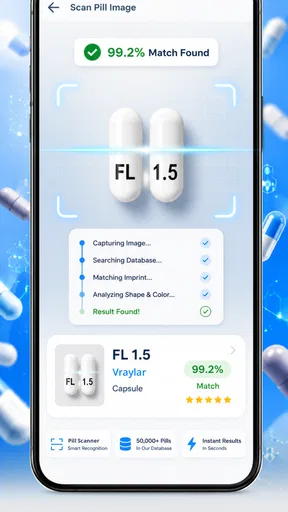
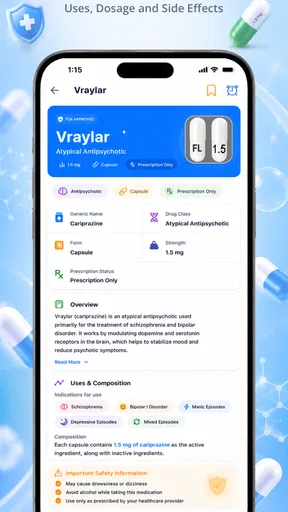
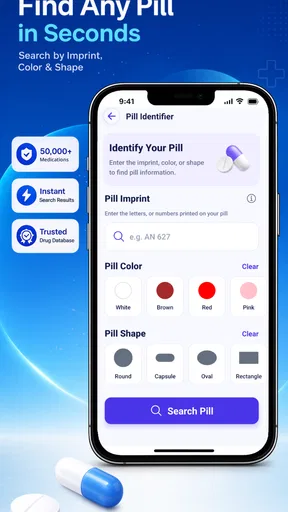
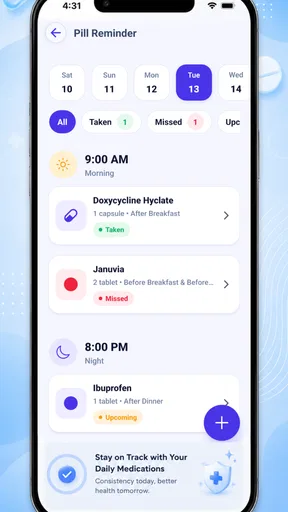
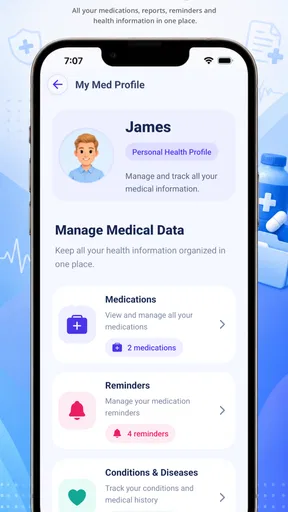
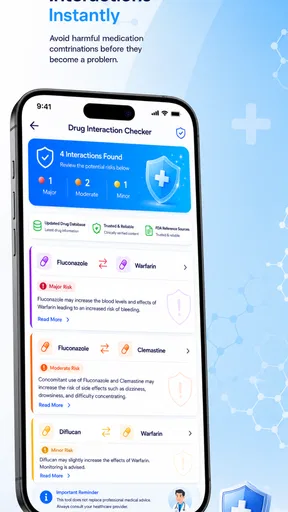
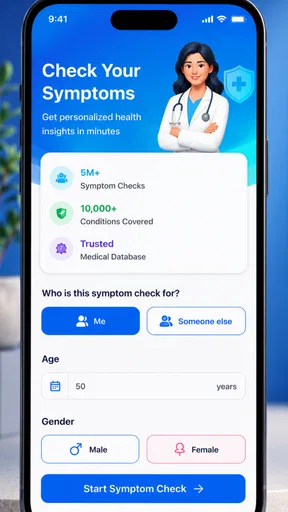
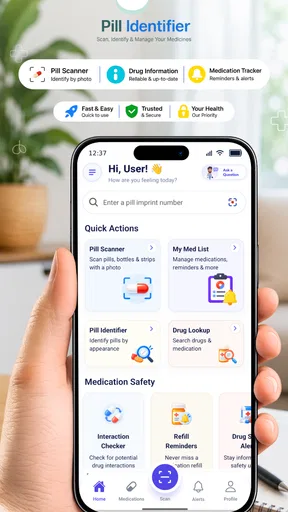
Our Review of Pill Identifier & Drug Search
 Analysis by Appyee
When I need to identify an unfamiliar tablet, I want an answer quickly, but I also want enough context to avoid confusing similar medicines. Pill Identifier & Drug Search is a free medical app from FriendsApp Listing that focuses on that practical problem. I tested it as the kind of tool someone might keep on a phone for a medicine cabinet, a family member’s prescription, or an unexpected pill found outside its original packaging. My overall impression is useful but cautious: it can make an initial search easier, yet it should support a pharmacist or doctor rather than replace one.
The app is aimed at identifying pills, searching for different drugs, and reading related medicine information. Its store short description is simply “Pill Identifier,” which is a fair summary of its main purpose. It is available for Everyone, works on Android starting with version 7.0, and is free to use. The current version is 5.2.4, while the app was released on January 25, 2019. Those details make it accessible to people using older Android phones, although the experience can still depend on the screen, font settings, and performance of the individual device.
How clearly the app supports different people and situations
I’d use this section to look beyond the basic search and consider how the app fits different levels of confidence, reading comfort, and caregiving responsibility. In my view, the most useful approach is to treat identification as a shared check when needed: the person searching can gather clues, while someone familiar with the medicine or a pharmacist helps resolve uncertainty. That distinction matters especially when a quick lookup could otherwise be mistaken for personal medical advice.
Readability and navigation during a medicine search
The most important part of an identifier is not visual polish; it is whether I can move from an uncertain pill to a sensible search without getting lost. This app’s purpose is immediately understandable, so it has an advantage over broader health apps that bury medicine lookup inside several unrelated sections. I can approach it with a specific task in mind: identify an item, search for a drug, or inspect information connected with a medicine.
That focused design is especially helpful for someone who does not use medical terminology confidently. A person may know the color, shape, or marking on a pill but not know its generic name. Starting with physical clues is more natural than being forced to remember a brand. I would still read every result carefully because a partial match can look convincing even when it is not the right medicine.
For users with low vision, readability deserves more attention than the simple presence of text. I found that a pill-identification result should be treated as something to inspect slowly, not skim. Drug names, dosage information, warnings, and similar-looking alternatives can carry very different meanings. Increasing the phone’s system text size may help, but enlarged text can also cause wrapping or make a result require more scrolling. I recommend checking the entire entry rather than relying on the first prominent line.
People who have difficulty processing dense information may benefit from a two-pass routine. First, use the search to narrow down the possible medicine. Then pause and read the details in a quieter setting, checking the imprint, shape, and color against the physical pill again. This is more reliable than trying to make a decision while distracted, such as in a busy kitchen or during a rushed medication handoff.
The app’s rating sits at 3.7 from around 1.3 thousand ratings, with over 500 reviews. I see that as a sign that it is useful for many people but not universally effortless. In practice, an identifier has a narrow margin for confusion: a search that feels mostly right is not good enough for taking a medicine. The app is at its best as an organized first check, not as permission to swallow an unknown pill.
Motor, sensory, and cognitive considerations
Touchscreen medical tools can be difficult for people with tremors, limited dexterity, arthritis, or one-handed use. A search workflow that requires precise taps can become frustrating when the user is holding a pill bottle, helping another person, or trying to work quickly. I found it easier to use the app when I prepared the information first: I placed the pill on a clean surface, noted its visible characteristics, and then handled the phone with both hands.
That small change matters because it reduces the need to alternate repeatedly between the medicine and the screen. It also lowers the chance of accidentally selecting the wrong result. If typing is uncomfortable, I would keep the search terms short and deliberate rather than attempting a long description. A concise query based on the visible marking is easier to correct than a rushed sentence full of guesses.
Users with color-vision differences should be careful with color-based identification. Color can help narrow a search, but it should never be the only clue, and lighting can make a tablet appear different from its usual appearance. The imprint, shape, and form are more useful when combined. Someone with reduced vision may also need another person to verify tiny markings, but that person should confirm the physical pill rather than simply reading the first app result aloud.
For users with hearing loss, a text-centered medicine lookup can be more practical than a service that depends on spoken explanations. For users with speech difficulties, typing a drug name or its marking avoids the need to describe it verbally. On the other hand, people who rely heavily on spoken interaction may find a standard touch-and-text workflow less comfortable. I would not assume that the app offers specialized voice control or screen-reader optimization; those needs should be tested directly on the particular phone before relying on it.
Cognitive load is another concern. Drug information often includes unfamiliar names and warnings, and a person who is ill, anxious, or caring for someone else may struggle to separate identification from treatment advice. My preferred workflow is to write down the result, compare it with the packaging or prescription, and ask a pharmacist when anything conflicts. That makes the app part of a safety process instead of the entire process.
Using it in everyday and time-sensitive situations
A realistic example is finding a loose tablet in a weekly organizer. I would not take it immediately or give it to someone based on appearance alone. I would place it somewhere secure, record the imprint and visible features, search the app, and compare the result with medicines previously prescribed in the household. If the match is incomplete, I would bring the tablet to a pharmacist. This workflow uses the app for speed while keeping professional confirmation for the final decision.
Another useful situation is preparing for a conversation with a clinician. A person may have several medicines with similar names and want to understand which one is which before an appointment. Searching each name can help organize questions about purpose, directions, or possible confusion. I would use the app to make a written list, then take that list to a doctor or pharmacist rather than changing a dose based on what I read.
The tool may also help a caregiver who is sorting medicines for an older relative. In that setting, readability and motor control become shared issues: the caregiver may be able to perform the search, while the person taking the medicine needs the final information explained clearly. I would avoid relying on memory after the search. Keeping the original labeled containers nearby and checking one medicine at a time is safer than identifying several pills in a pile.
Situational access can be just as important as permanent disability. Poor lighting, glare, wet hands, fatigue, stress, and a small phone screen can all make identification harder. I would use a bright but even light, clean the screen, and avoid searching while walking or driving. If the phone is older, allowing extra time for pages or results to load is sensible; rushing increases the chance of tapping a similar entry.
The free price is a practical advantage for occasional users. Someone who only needs a medicine lookup once does not have to commit to a paid medical reference. The trade-off is that free access should not be mistaken for clinical authority. The app can reduce the effort of finding information, but it cannot inspect the pill’s history, confirm who it belongs to, or know whether a particular medicine is appropriate for an individual.
Where it compares well with usual alternatives
The usual alternative is a web search. A browser can find a large amount of information, but broad results often mix pharmacies, advertisements, forums, and pages written for different countries. A dedicated pill-search app is more convenient when the task is specifically identifying a tablet because it keeps the user closer to a medicine lookup rather than a general internet search.
The other common alternative is asking a pharmacist. That remains the better option when the pill is damaged, the imprint is unreadable, the result has multiple possibilities, or there is any concern about poisoning or an accidental dose. A pharmacist can consider the packaging, prescription history, and circumstances. Pill Identifier & Drug Search is faster for an initial check, but it does not offer the same human judgment.
Compared with a medication-reminder app, this product serves a different need. A reminder tool is usually better for schedules and adherence, while this app is more useful when the identity or basic information of a medicine is uncertain. Compared with a full clinical reference, it is likely to feel simpler and more approachable for a casual search, but a professional reference may be preferable for detailed interactions, dosing decisions, or specialized medical work.
One non-obvious trade-off is that a focused identifier can encourage overconfidence. Because the search feels straightforward, a user may forget that physical appearance alone is not a complete chain of custody. I would never use a result to authorize a medicine for another person, combine drugs, stop treatment, or estimate a dose. For those decisions, the app is the beginning of a question, not the answer.
Remaining barriers and practical ways around them
The biggest barrier is ambiguity. Pills can share colors, shapes, or markings, and a worn imprint may produce an attractive but incorrect match. The safest habit is to require several matching characteristics and the original container whenever possible. If the result does not agree with the label, prescription, or pharmacist’s explanation, stop there rather than choosing the closest-looking entry.
Another barrier is the language of medicine. Even when the app presents useful information, terms may be hard to understand for people with limited health literacy, reading difficulties, or a different preferred language. I would copy unfamiliar terms into a note and ask a professional to explain them. A family member can help with reading, but should not translate a warning into personal treatment advice without checking the source.
Screen size can create a hidden problem. On a compact phone, long drug names and warnings may wrap into several lines, and a user with reduced attention may miss information lower on the page. I recommend rotating the phone only if that makes reading easier, enlarging text carefully, and scrolling to the end of each result. If someone else is assisting, the helper should read the full relevant entry rather than summarize it from memory.
There is also a privacy consideration in everyday use. Searching a medicine can reveal sensitive health information to anyone looking over the user’s shoulder or sharing the device. I would avoid conducting a personal lookup in a crowded place when possible and would not hand an unlocked phone to another person without considering what else is visible. These are general phone-use precautions, but they matter more when the search concerns a private prescription.
People who need guaranteed accessibility support, a highly specialized database, or direct professional consultation may be better served by a pharmacist, a healthcare provider, or a medical reference designed for their specific needs. I would also skip this app as the sole resource during an emergency. Suspected overdose, severe symptoms, or an unknown substance requires urgent professional help, not a slow process of comparing pictures and search results.
Who will get the most value from it
I think the app suits Android users who want a quick, free way to investigate an unfamiliar pill before asking a more informed question. It is particularly practical for households with several prescriptions, caregivers organizing medicine information, and people who occasionally encounter a tablet outside its packaging. The fact that it supports Android 7.0 or later also makes it relevant to users who have not upgraded to a newer phone.
Its audience is substantial: the app has passed 100 thousand installs, which suggests that the basic problem it addresses is common. Still, popularity does not remove the need for verification. I would judge it by how well it fits a careful workflow, not by the install figure or its average rating alone.
I would skip it if I wanted a complete medication-management system, personalized treatment guidance, or a substitute for a medical professional. It is also a poor fit for anyone who cannot comfortably read small medical text and has no reliable assistance, unless the phone’s accessibility settings make the content genuinely usable. Testing the app with the actual device and the user’s normal text size is more meaningful than assuming that a general Everyone rating guarantees effortless access.
My inclusive verdict
After using Pill Identifier & Drug Search, I see it as a useful first-stop tool with a clear everyday purpose. Its strongest quality is focus: it helps turn an uncertain pill or drug name into a more structured search. The free access and support for older Android versions make that first step available to a broad group of users, including people who do not need a medical reference every day.
Its limitations are just as important. Identification can be uncertain, medical language can be demanding, and touch-based searching may not suit every motor or sensory need. The app should be used in good lighting, with the physical medicine and original packaging available, and with enough time to read the complete result. For anyone who depends on a screen reader, enlarged text, voice interaction, or assistance from another person, I would test the actual workflow before an urgent situation occurs.
My recommendation is to use it as a careful information aid, never as the final authority on taking a medicine. If you understand that boundary, the app can save time and help you prepare better questions for a pharmacist or doctor. If the pill is unmarked, the result is ambiguous, or someone may have taken the wrong medicine, professional help is the better choice. In that role, this medical app is practical, approachable, and worth trying, but its real value depends on the caution and accessibility habits the user brings to it.
Verdict
Strengths of Pill Identifier & Drug Search
- Identifies many pills using shape, color, imprint, and dosage details.
- Provides quick access to drug uses, warnings, and common side effects.
- Useful for checking unfamiliar medication before contacting a pharmacist.
- Search tools make it easy to browse medicines by name or active ingredient.
- Helpful reference when organizing prescriptions or reviewing a medicine cabinet.
Limitations of Pill Identifier & Drug Search
- Identification results should always be confirmed by a pharmacist or healthcare professional.
- Some medicines or regional brands may be missing from the database.
- Drug information may not reflect the latest label or safety updates immediately.
- The app cannot determine whether a medication is suitable for your condition.
- Advertising or premium features may interrupt searches and limit some information.
Similar Picks in This Category
View All
WebMD: Symptom Checker
WebMD, LLC4.1

Microphone Amplifier
DOSA Apps4.2

Anatomy Learning - 3D Anatomy
3D Medical OU4.5

Period Tracker and Calendar
SimpleInnovation4.9

GoodRx: Prescription Coupons
GoodRx4.8

CVS Health
CVS Pharmacy4.5
Frequently Asked Questions
What is Pill Identifier & Drug Search used for?
Pill Identifier & Drug Search is designed to help users look up medicines by entering details such as the pill’s imprint, color, shape, or medication name. It can provide general information about possible uses, active ingredients, dosage forms, and warnings. However, the results are intended for reference only and should not replace advice from a doctor or pharmacist.
Can this app accurately identify any pill or medication?
The app may identify many prescription and over-the-counter medicines when the imprint and physical characteristics are entered correctly, but it cannot guarantee an accurate result for every tablet, capsule, supplement, or foreign medication. Similar-looking pills can have different ingredients, and some products may not appear in the database. Always confirm an identification with a qualified healthcare professional before taking an unknown pill.
Does Pill Identifier & Drug Search provide dosage or treatment advice?
The app may display standard medication information, including commonly listed strengths, uses, precautions, and dosage details. This information is general and may not apply to your age, medical history, allergies, pregnancy status, or other medicines. Do not change a prescribed dose, stop treatment, or combine medications based only on the app. A doctor or pharmacist should provide personalized guidance.
Is it safe to use the app for an unknown pill or possible overdose?
You should never rely on the app alone when someone has taken an unknown substance, the wrong medicine, or more than the recommended amount. Identification results can be incomplete or incorrect, and delays may be dangerous. In an emergency, contact local emergency services or a poison control center immediately, and keep the packaging or pill available for medical professionals.
Does the app replace a doctor or pharmacist?
No. Pill Identifier & Drug Search is a convenient educational reference tool, not a diagnostic service or substitute for professional medical care. It cannot evaluate symptoms, confirm whether a medication is appropriate, or predict how a drug will affect you personally. Use the information to prepare questions, but consult a licensed healthcare professional before starting, stopping, or changing any medication.
